The microphone icon that appears during audio recording on Android is a privacy indicator. This guide is about the following topics.
Questions about the topic
How do i remove the camera and mic indicator?
I noticed an annoying green icon everytime i start my camera or use the microphone. How do I remove them? I really hate them.How do deactivate the green sensor indicator?
I recently noticed the green indicator lighting up when I use my phone, indicating that the microphone or camera is being accessed. How can I disable that function, it is a bit irriating as it keeps popping on when I use the phone?How to get rid of the microphone icon on the statusbar?
Is there is a way ro disable mic usage indicator in android 12
How to turn off green microphone icon Android?
Steps to hide the microphone icon:
### Installing ADB on macOS:
- Download the Android SDK Platform Tools from the official Android Developer website: ملاحظات إصدار أدوات SDK Platform | Android Studio | Android Developers
- Extract the downloaded ZIP file.
- Open Terminal and navigate to the extracted directory.
- You can use ADB directly from this directory or move it to a location in your system PATH for easier access.
### Installing ADB on Windows:
- Download the Android SDK Platform Tools from the official Android Developer website: SDK Platform Tools release notes | Android Studio | Android Developers
- Extract the downloaded ZIP file to a location on your computer (e.g.,
C:\platform-tools).
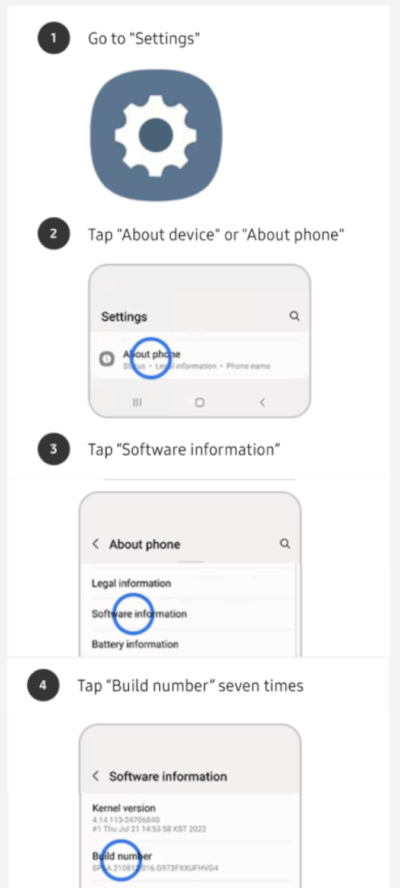
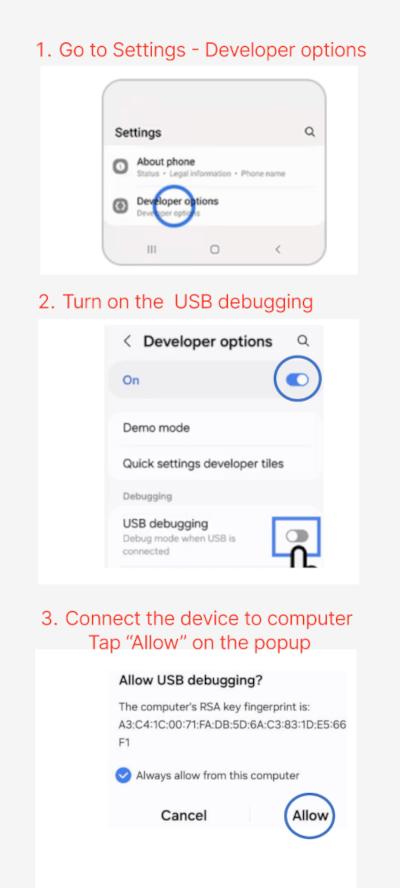
### Enable Developer Options and USB Debugging:
- Go to Settings > About phone.
- Tap Build number 7 times to enable Developer Options.
- In Settings > Developer options, turn on USB debugging.
### Connect Your Device to the PC:
- Use a USB cable to connect your Samsung phone to your computer.
- Ensure ADB is properly set up on your PC.
### Check ADB Connection:
Open a terminal or command prompt and run:
adb devices
This should list your connected device. If your device is not listed, troubleshoot the ADB connection.
### Disable the icon:
Run the following command to disable the icon:
adb shell cmd device_config put privacy camera_mic_icons_enabled false default
adb shell cmd device_config set_sync_disabled_for_tests persistent